























Buy Now. Pay With  Learn More
GUIDES AND INSTRUCTIONS · HOME TUNING TOOLS
JFA Touch Tune: tuning your own car at home
The four pre checks that actually matter, the read and write sequence including the step that surprises everyone, and what the light colours mean.
Browse the Knowledge Centre
Services and modules
Diagnostics and ECU
Emissions systems
Gearbox and transmission
Performance and limiters
Sound and character
Questions and answers
Common questions
- Can the remap be reversed?
- Do I need to tell my insurance company?
- Do you take a deposit?
- How long will my remap take?
- I already have modifications. Does that affect the remap?
- The 30 day money back guarantee
- What do Stage 1, Stage 2 and Stage 3 mean?
- What if a main dealer wipes the map with a software update?
- What is bench tuning?
- What is ECU remapping?
- Why choose a remap over a diesel tuning box?
- Will a remap affect my warranty?
- Will a remap shorten the life of my engine?
Tools
Diagnostics and ECU
Guides and instructions
Dealer troubleshooting
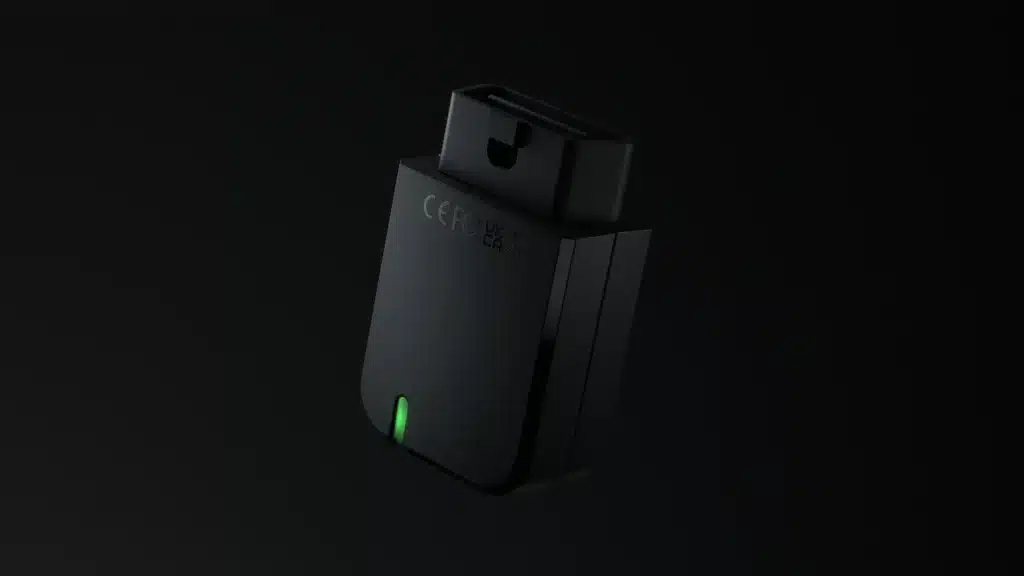
The JFA Touch Tune is a plug in device the size of a matchbox with no screen and
no buttons. It has a coloured light, and everything else happens in an app on your
phone. It works through the diagnostic socket only, and it will do the engine unit
and, on a growing list of cars, the automatic gearbox as well.
One device tunes one car. It ties itself to your vehicle by chassis number and
stays there. You can add a second car later, but that is a paid addition we have
to set up rather than something you can do yourself, so ask us first.
Tick each step off as you go. The page remembers where you got to.
Before you plug anything in
Voltage causes almost every problem we get called about. Most cars are
perfectly fine, but the job runs with the engine off, so the battery is on its own
for the whole write. Two minutes of preparation takes the risk out of it.
- Start the car and let it run for five minutes first. That puts
some charge back before you begin. If the car has been stood a while, is slow to
start, or is on an older battery, put a charger on it instead. - Switch off everything auxiliary. Headlights, heating and air
conditioning, interior lights, heated seats, heated screens, radio, phone
chargers. Then ignition on, engine off, and nothing else drawing current. - Give yourself three quarters of an hour. Park somewhere you
are happy to leave the car standing. Most of that time is waiting, but it is not
something to squeeze in between other jobs.
Four things to do before you touch the tool
- Charger on the car. This is the manufacturer’s own first
instruction, not our embellishment. - Good signal at the car, either mobile data or Wi-Fi.
- Turn off Apple CarPlay or Android Auto. Your phone talking to
the car and to the tool at the same time causes failures that look like tool
faults and are not. - Bluetooth on and location services on.
Then install the app and register. Use the email address you gave us, because
that is the one the tool was activated against.
Download on theApp StoreGet it onGoogle PlayThe app is called My Flasher, not Touch Tune.
Searching the store for our name will not find it, so use the code on the sleeve
the tool came in, or the buttons below.
Stage one: reading your car
- Ignition on, engine not running. Air conditioning, radio and everything else
off. - Plug the tool into the diagnostic socket.
- Open the app and pair with the tool.
- Press read and let it run. It works out the car and the
protocol itself, so there is no list to pick your way through and no wrong option
to choose. - When it finishes, go to the chat tab and ask us for the file. Tell us anything
we should know: existing faults, hardware changes, what you are after. - Unplug the tool and switch the ignition off.
The read comes straight through to us. When the tune is ready you get a
notification.
Stage two: writing the file
Run through the same four pre checks first. Then:
- Plug the tool back in, ignition on, engine off.
- Press read again. That is not a mistake in this guide. The
write sequence starts from the read button and the app then prompts you. People
hunt for a write button, cannot find one, and give up at this exact point. - When the app offers it, press write.
- Wait for the confirmation on screen, then unplug the tool, ignition off,
charger off.
Where your car has a supported automatic gearbox you get two files, one for the
engine and one for the gearbox. They are written the same way, one after the
other, and there is no extra charge for the second.
What the light is telling you
- Green, blinking slowly. Ready and waiting. The normal resting
state. - Blue, blinking fast. Working: pairing, reading or writing.
Leave it alone. - Yellow, blinking fast. It wants restarting. Close the app
completely, unplug the tool, wait a couple of minutes and start again from the
beginning. - Orange. A minor hiccup it has already dealt with. It goes
back to green on its own. - Red, blinking fast. Something failed. This can happen at
pairing, if the phone loses contact with the tool, or during a read or write. - White, blinking slowly. Updating itself. Do not interrupt
it.
Going back to standard
Your original read is stored against your car at our end for as long as you
have the tool. Ask us in the chat and we send the original back through as a file,
and you write it the same way you wrote the tune. There is no limit on how many
files we send you and no charge for sending them.
If it stops part way through
Stop and read this before you do anything
Do not unplug the tool. Do not switch the ignition off. Leave
the car exactly as it is, leave the charger connected, and call us on
01622 321500.A write that has stopped is usually recoverable while everything is still
connected. The same write becomes a much bigger job once the tool has been pulled
out and the ignition cycled. We would far rather take the call.Do not contact the tool manufacturer. They only deal with the workshop, not the
end user, so going direct will cost you a day. We are your support.
With this tool specifically, a red light during a write is exactly when to stop
and phone rather than experiment. We can see the log of what the tool did, so tell
us what you saw and leave the diagnosis to us.
BMW F and G series: the car has to be set up first
If you have an F or G series BMW, the car will refuse to go into programming
mode unless it is set up exactly right, and the tool will look like it has failed
when it has not.
- A proper charger on the battery. BMW want a genuine 50 amps
available for this, not a small maintainer. - Key inside the car.
- Hazard lights on.
- Driver’s seat belt fastened.
- All doors closed. If you need to be out of the car, latch the driver’s door
catch closed with a screwdriver rather than leaving the door open. - Gearbox in Park, or Neutral on a manual.
Then follow the tool’s instructions as normal. Miss any one of these and the
write will not start.
Have not got a tool yet?
Everything above assumes one of ours is already in your hand. If you are
starting from scratch, tell us the car and what you are after and we will say
honestly whether it can be done on your drive or whether it needs to come to us,
and which of the three tools suits it.
RELATED
More on home tuning tools
JFA Elite Flash: fitting your gearbox tune
Our own plug in gearbox tool. No laptop, no phone, no file to send. Plug it in, wait…
Read thisPowergate 4: tuning your own car at home
Work through it on your phone with the car in front of you. Every step ticks off, so…
Read thisIXI Flasher: tuning your own car at home
The one that needs a Windows laptop rather than a phone. Set up, read, write, and the cable…
Read thisMeet The Team


Search Tuning...
Search our ECU tuning options to increase the power and torque of your vehicle and our wide range of performance parts.